

How to Set Up a Pinterest Business Account That Actually Drives Traffic
Most people create a Pinterest business account, post a few pins, get no traction, and conclude that Pinterest “doesn’t work for them.” The problem almost never lies with Pinterest itself — it lies with the setup.
A Pinterest business account configured correctly behaves more like an SEO asset than a social media profile. It surfaces your content in searches, compounds traffic over time, and reaches people who are already in a buying mindset. Set it up wrong and you’re shouting into a void. Set it up right and you’re building a traffic engine that runs quietly in the background for months.
This guide walks you through every step — from creating the account to structuring your boards for maximum reach — so you leave with a profile that’s actually built to drive traffic, not just exist.
Why a Pinterest Business Account Is Different From a Personal One
Before touching any settings, it’s worth understanding what you’re actually unlocking with a business account.
Pinterest business accounts give you access to Pinterest Analytics, Rich Pins, optional paid promotion, and — critically — the ability to claim your website. That last one tells Pinterest your domain is verified, which directly boosts how widely your pins are distributed across the platform.
According to Pinterest’s official business resources, business accounts also receive preferential treatment in Pinterest’s search algorithm compared to personal profiles. Content from verified, active business accounts gets broader distribution in both search results and home feeds — which is the whole game when you’re using Pinterest as a traffic source.
If you already have a personal Pinterest account, you can convert it to a business account in settings without losing any existing content, followers, or boards. There’s no reason to start from scratch.
Understanding why this setup matters becomes clearer when you see how Pinterest compares to other free traffic channels. For a full picture of where Pinterest sits relative to SEO, YouTube, and email, this breakdown of the best free traffic sources for affiliate marketers ranks each by buyer intent and ease of entry — useful context for deciding where to invest your energy first.
Step-by-Step: Setting Up Your Pinterest Business Account
Step 1: Create or convert your account
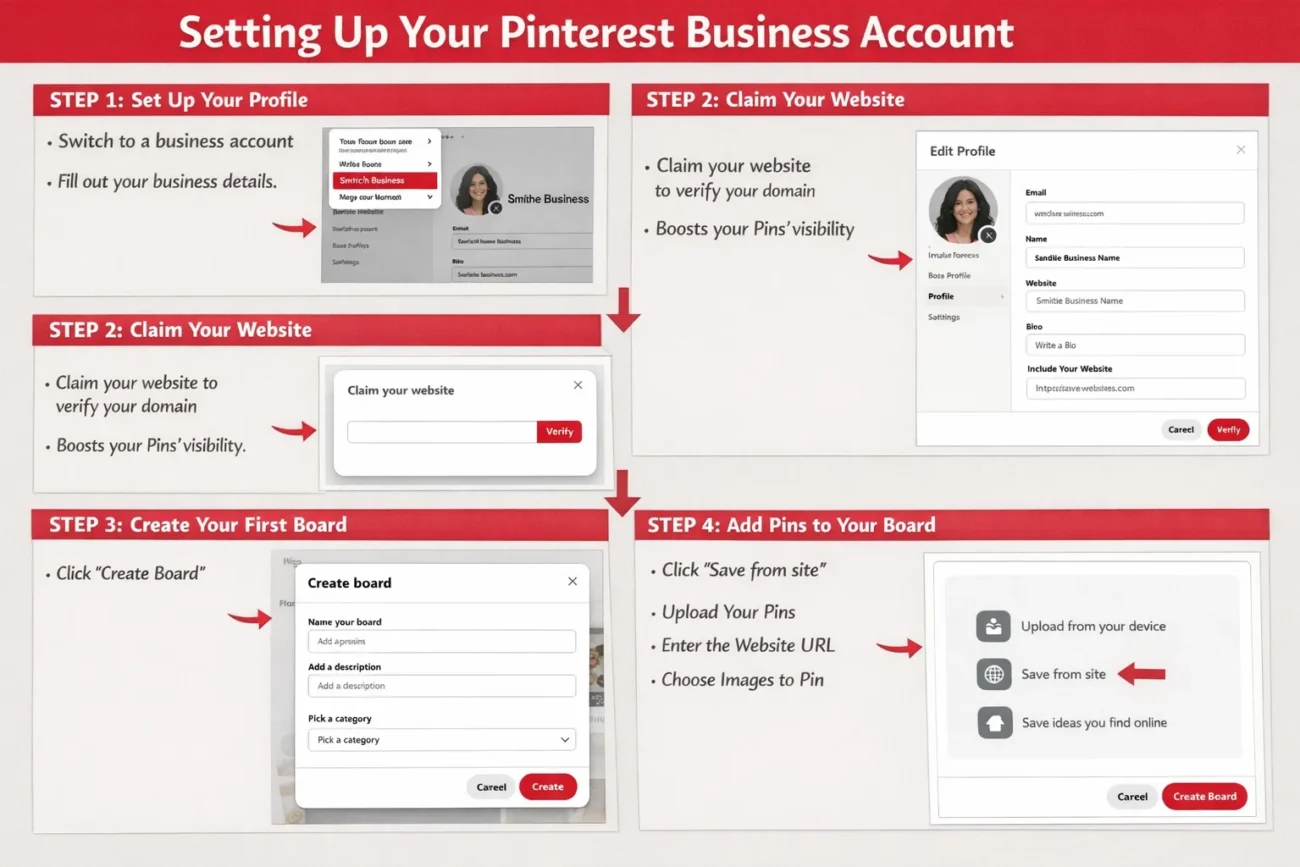
Go to pinterest.com/business/create to create a new business account, or navigate to Settings → Account → Convert to business account if upgrading an existing profile.
You’ll be asked for your business name, business type, and website URL. Use your actual brand name — not a personal name — and select the business type that most closely matches your niche. Pinterest uses this information to calibrate what content and audiences it associates with your profile from day one.
Step 2: Optimize your profile for search
This step is skipped by almost everyone and it’s one of the highest-leverage actions you can take.
Profile name: Include your primary keyword here, not just your brand name. “Sarah’s Kitchen | Healthy Meal Prep Recipes” performs measurably better in Pinterest search than just “Sarah’s Kitchen” — because Pinterest reads your profile name as a relevance signal.
Bio (160 characters): Write this like a meta description. Lead with what you do, include one or two relevant keywords naturally, and end with a light call to action. “Helping home cooks eat better with quick, healthy recipes. Follow for weekly meal prep ideas and free guides” is the right structure.
Profile photo: Use a clean logo or professional headshot. Consistency with your branding across other platforms helps with recognition when Pinterest users encounter your pins in search.
Step 3: Claim your website
Go to Settings → Claim and follow the instructions to add a meta tag or upload an HTML file to your site. Once claimed, every pin linking to your domain displays your profile photo alongside it — giving you attribution credit and a meaningful boost in how widely Pinterest distributes your content.
This step takes about 10 minutes and has a disproportionate impact on reach. According to Pinterest’s developer documentation, claimed websites also receive better analytics data and more accurate traffic attribution — making your optimization decisions more reliable over time.
Don’t skip this.
Step 4: Structure your boards strategically
Boards are Pinterest’s version of categories — and how you name and describe them directly affects whether your content surfaces in search results.
Board naming: Be specific and keyword-rich. “Recipes” will not rank in Pinterest search. “Quick Healthy Dinner Recipes for Busy Families” targets an actual search query that people type. Think about what your ideal visitor would search for, then name your board that.
Board descriptions: Write 2–3 sentences using natural language that includes relevant search terms. Pinterest reads these when deciding what searches to surface your board in — treat them like on-page SEO copy, not placeholder text.
Number of boards: Start with 5–8 tightly focused boards rather than 20 loosely defined ones. Depth beats breadth in the early stages — Pinterest rewards boards that stay consistently on-topic with broader distribution.
Cover images: Set a custom cover image for each board. Profiles with cohesive, well-designed board covers have measurably higher follow rates from new visitors landing on your profile page.
Step 5: Enable Rich Pins
Rich Pins pull metadata directly from your website, making your pins more informative and significantly more likely to be saved. There are three types relevant to most marketers: Article, Product, and Recipe.
To enable them, your site needs Open Graph or Schema.org markup — most WordPress SEO plugins like Yoast or Rank Math handle this automatically. Then validate your URL at Pinterest’s URL debugger to complete the activation.
Once approved, your article pins automatically display the headline, author, and article description pulled live from your site. Your product pins update with current pricing and availability. Both formats consistently outperform standard pins in saves and click-throughs.
What to Pin First (And How Often)
A freshly created board needs content before Pinterest will distribute it meaningfully. The practical starting point:
Pin 10–15 pieces of content to each board before promoting it or linking new traffic to it. This signals to Pinterest that the board is substantive. Mix original content with repins from other high-quality creators in your niche — roughly 80% repins to 20% original content is a reasonable starting ratio.
Frequency matters more than most people expect. Pinterest rewards consistent daily activity over sporadic high-volume sessions. Aim for 5–15 pins per day distributed across your boards — not 50 pins on Monday and nothing for the rest of the week.
That consistency requirement is where most marketers eventually stall. Maintaining daily pinning activity across multiple boards manually is a real time commitment, especially if you’re running more than one niche or managing client accounts. It’s the primary reason many serious Pinterest marketers move to automation — tools like Pinflux handle the scheduling, content discovery, and repinning automatically once your boards are configured, so the daily activity continues without requiring your daily attention.
If you want to understand what that looks like in practice before deciding whether it’s right for your workflow, the full breakdown is here: Pinterest marketing automation: how to get free traffic fast.
Common Setup Mistakes to Avoid
Using a personal account for business content. You lose analytics, Rich Pins, and algorithmic distribution advantages. Always use or convert to a business account before building any content strategy on top of it.
Skipping the website claim step. Free, takes 10 minutes, meaningfully boosts distribution. There’s no reason not to do this on day one.
Boards that are too broad. “Health and Fitness” will not rank. “At-Home Workouts for Beginners With No Equipment” will. Every board name should reflect a real search query your target audience uses.
Posting in bursts. Uploading 50 pins on Monday then nothing for two weeks confuses the algorithm and suppresses distribution. Consistent modest daily activity outperforms irregular high-volume sessions every time.
No keywords in board descriptions. Pinterest is a search engine first. Board names and descriptions are the primary signals it uses to decide where your content appears. Treat them accordingly.
Leaving Rich Pins disabled. This is a free upgrade that makes every pin more informative and more shareable. The 10-minute setup process has no downside.
Once Your Account Is Set Up: What Comes Next
A properly configured Pinterest business account is the foundation. What determines whether it actually drives meaningful traffic is what you build on top of it — how consistently you’re pinning, how well your content matches what people are searching for, and how actively your boards are growing.
Done manually across two or three boards in different niches, that’s a 1–2 hour daily commitment. Done with automation in place, it runs largely without your involvement after the initial setup.
The next logical step is understanding how Pinterest automation actually works and what realistic results look like — which is exactly what this post covers: Pinterest marketing automation: get free traffic fast.
Frequently Asked Questions
Can I convert my personal Pinterest account to a business account without losing followers or pins? Yes. Converting is entirely non-destructive — all existing pins, boards, and followers carry over. You simply gain access to business features like analytics, Rich Pins, and website claiming. There’s no reason to create a separate account if you already have an established personal presence.
Does having a Pinterest business account help my content rank higher in Pinterest search? Yes, indirectly. Business accounts can claim their website, which boosts content distribution. They also access analytics to optimize their strategy and can enable Rich Pins — all of which contribute to better performance in Pinterest search over time compared to unclaimed personal accounts.
How many boards should I create when starting out? Start with 5–8 tightly focused boards. Each board should target a specific, keyword-rich topic that reflects an actual search query. It’s far better to have fewer boards with consistent, high-quality content than many boards that are sparse or unfocused — Pinterest’s algorithm penalizes inactivity at the board level.