

WarriorPlus for Beginners: How the Marketplace Works for Vendors
You’ve seen the leaderboards. You’ve bought products on WarriorPlus. You’ve watched other people post screenshots of their sales dashboards, and somewhere along the way you started wondering what it would actually take to be on the other side of one of those transactions.
The answer is less complicated than it looks — but the platform has enough moving parts that most first-time vendors get stuck before they ever launch. They create a product and then can’t figure out why it won’t go live. Or they set up an offer but have no idea how affiliates find it. Or they launch and make two sales from their own list and nothing after that.
This guide covers how WarriorPlus works for vendors — the actual mechanics, in order, from account setup to your first live funnel. By the end you’ll understand exactly what a product, an offer, and a funnel mean on this platform, and what you need to do to get approved and start selling.
If you’re still deciding whether to build your own product, How to Create and Launch a Digital Product With AI (Step-by-Step) covers that decision and the full build process. This post assumes you’ve made the decision and you need to understand the platform.
Why First-Time Vendors Stall on WarriorPlus
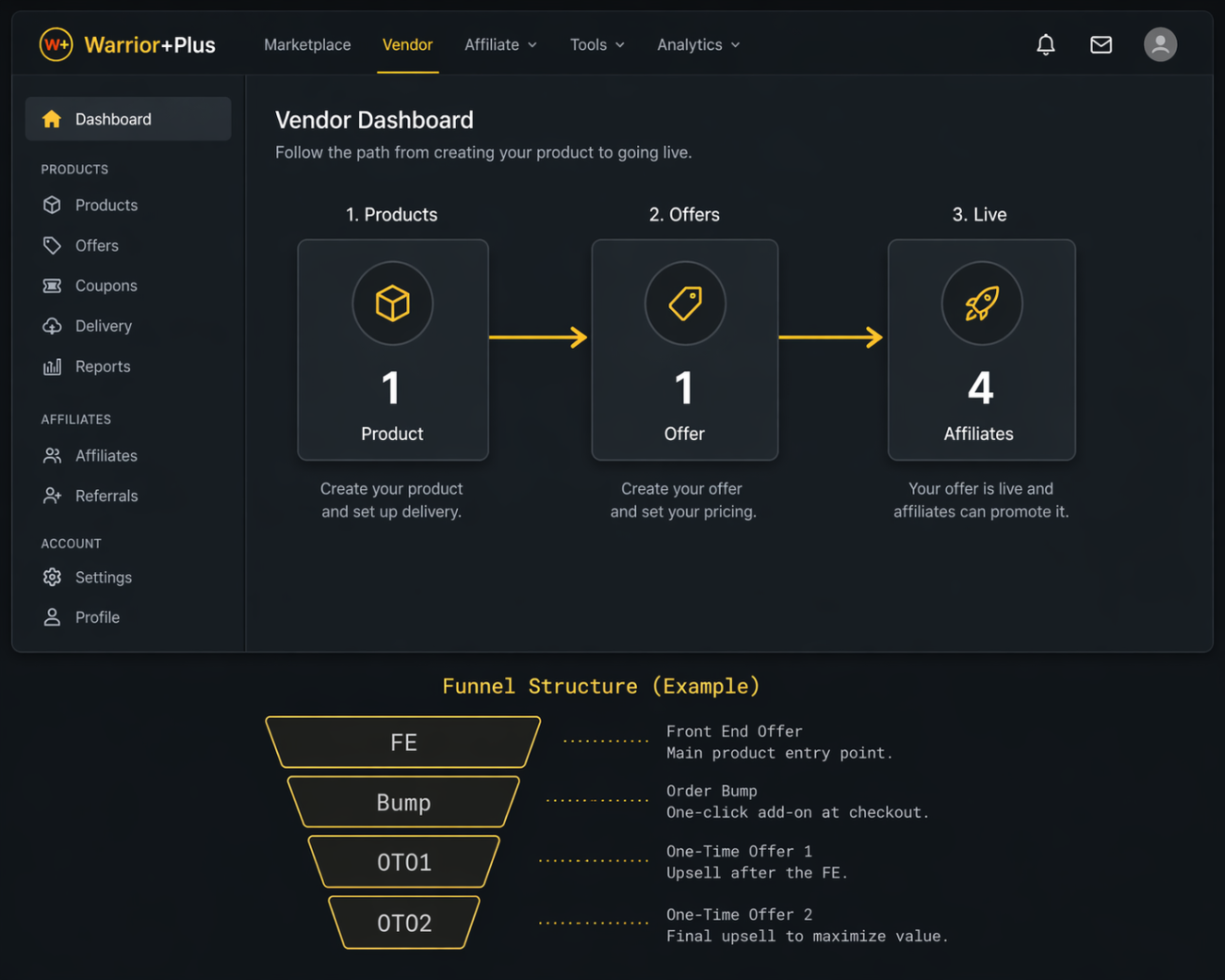
The most common misconception is that creating a product is the same as being ready to sell. It isn’t. WarriorPlus separates “products” and “offers” into distinct entities — and you cannot submit for review, go live, or recruit affiliates until both are set up correctly and linked together. Most beginners create a product, try to find a “launch” button, and find none. That’s because the offer hasn’t been created yet.
The second sticking point is affiliates. WarriorPlus has a built-in marketplace of affiliate marketers actively looking for new products to promote — but they won’t find yours unless you set up an Offer listing correctly, configure your commission structure, and have a profile that gives affiliates confidence you’re a legitimate vendor worth promoting.
“Most people promote other people’s products on WarriorPlus for years.
The ones who switch sides build assets that compound. The rest build someone else’s list.”
Neither of these problems is technical. They’re structural — you just need to understand how the platform layers are organized before you start building.
How WarriorPlus Is Actually Structured
What is the difference between a Product and an Offer on WarriorPlus?
This is the question that un-sticks most beginners. Here’s the distinction:
A Product is your deliverable — the eBook, video course, software, or template. You create it in the Vendor → Products section. It has a name, a description, and delivery settings. By itself, it cannot be sold.
An Offer is your sales funnel container. It groups one or more products into a purchasable package, defines the price, sets affiliate commission rates, links to your sales page and thank-you page, and is what gets submitted for WarriorPlus review. This is what goes live.
Think of it this way: the product is what you’re selling. The offer is how you’re selling it. You can attach multiple products to a single offer — main product, order bump, upsells — and you can have multiple offers that each use the same product at different price points. According to the official WarriorPlus vendor documentation, your product must be attached to a submitted offer before it enters the review queue — even if the product itself appears fully configured in your dashboard.
Setting Up Your First WarriorPlus Funnel: Step by Step
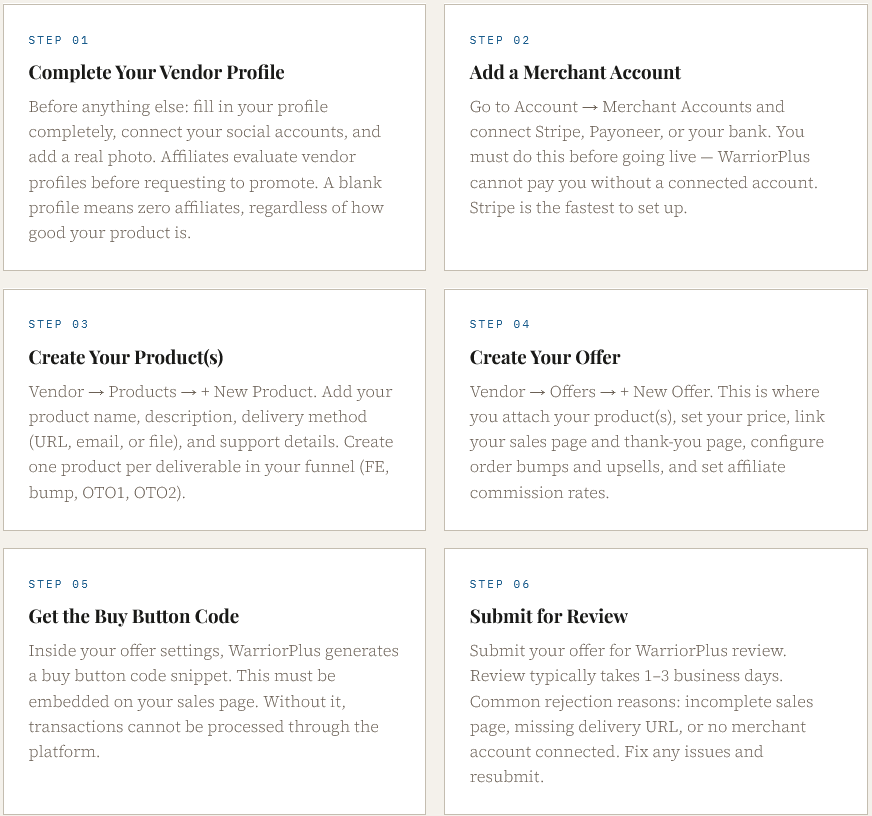
Follow this sequence in order. Skipping steps is the main reason submissions get rejected or stall in review.
How a WarriorPlus Funnel Is Structured
Most successful WarriorPlus launches use a multi-level funnel rather than a single product page. Here’s how a typical funnel layers out, using the Ship It launch as a real example:
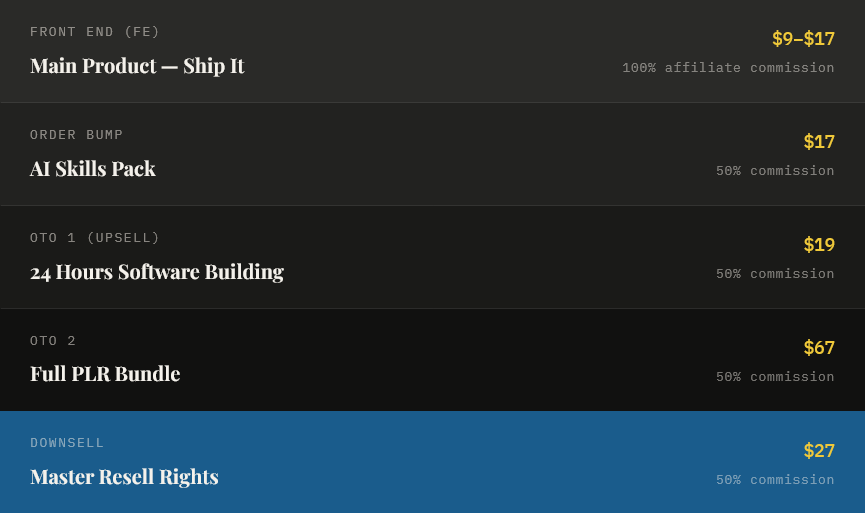
Front End (FE): Main product at $9–$17. Affiliates offered 100% commission. This is standard on WarriorPlus and is the primary tool for attracting affiliate partners — you earn on the upsells while affiliates earn on the front end.
Order Bump: An additional product offered on the checkout page at $17, 50% commission. Buyers can add it with a single checkbox — no extra checkout required.
OTO 1 (Upsell): Presented immediately after the front-end purchase at $19, 50% commission. This is where the vendor begins earning on top of the buyer acquisition cost covered by affiliates.
OTO 2: A higher-value offer at $67, 50% commission. Typically a larger bundle, PLR rights, or a premium version of the core product.
Downsell: A reduced version of OTO 1 or OTO 2 for buyers who declined the higher-priced offer — at $27, 50% commission. Recovers buyers who wanted the upsell but were price-sensitive.
Offering 100% commission on the front end is not a loss. It’s your buyer acquisition strategy. The WarriorPlus marketplace and affiliate network drive traffic you don’t have to build yourself — and every buyer who enters through the front end is now on your list, exposed to your upsell sequence, and a potential repeat customer. According to Search Engine Journal’s research on buyer intent, matching your offer language and funnel structure to the way buyers describe what they want is the strongest lever for both traffic quality and conversion rate — the same principle applies to how you structure your affiliate-facing offer on WarriorPlus.
What Realistic First-Launch Results Look Like

The Ship It launch generated 225 sales at an 11% conversion rate with under 1% refunds — with no existing audience, no paid ads, and no prior reputation in the niche. Traffic came from the WarriorPlus marketplace and affiliate partners recruited before launch day.
Understanding how buyer intent affects both product design and funnel structure is the underpinning here. Search Engine Journal’s guide to buyer intent keywords outlines why matching your offer language to the way buyers describe their problem — whether in a search query or on a sales page — is the single strongest lever for conversion.
A typical first-launch benchmark for a new vendor is 50–150 sales with a conversion rate of 3–6%. Hitting 11% with 225 sales reflects a product built from real market research and a funnel structured around what the marketplace expects — not a lucky launch. The sales page methodology behind that conversion rate is covered in How to Write a Sales Page That Converts (AI Prompt Framework).
If you want to see the complete system that produced these results — including the WarriorPlus setup bonus videos that screen-record the entire process from blank account to live funnel — the full breakdown is in the Ship It review. The system itself is available at Ship It.
Official reference: WarriorPlus Vendor Help Center — 47 articles covering product setup, offer configuration, affiliate management, refunds, and launch calendar submission. Bookmark this alongside this guide.
The Takeaway
WarriorPlus is one of the few platforms where a first-time vendor with no existing audience can launch a product and generate real sales on day one — because the marketplace and affiliate network provide traffic you don’t have to build yourself. But only if your offer is set up correctly and your product is built from what the market actually wants to buy.
The platform mechanics are learnable in an afternoon. The market research — the step that determines whether those mechanics produce results — takes more deliberate effort. Both are documented in Ship It, which was built specifically for people launching their first product on this platform.
FAQ
Typically 1–3 business days for a first submission, assuming everything is set up correctly. The most common reasons for rejection or delay are: missing or broken delivery URL, sales page with no buy button code, incomplete vendor profile, or a merchant account that isn’t connected. Fix any flagged items and resubmit — subsequent reviews are usually faster.
No. The WarriorPlus marketplace provides organic traffic from buyers browsing new product listings, and affiliates drive additional launch-day traffic if you recruit them in advance. The Ship It launch generated 225 sales predominantly from people who had never heard of the vendor before they bought — through the marketplace and affiliate partners, not an existing list. Your list grows as a result of launching, not before it.
The standard for competitive WarriorPlus offers is 100% on the front-end product and 50% on all upsells. Offering 100% on the FE is not a loss — it’s your buyer acquisition cost. You earn on the upsells, and you gain the buyer’s email address and the relationship. Offering less than 50% on upsells makes your offer less attractive to experienced affiliates who are comparing multiple launches at any given time.